Visualisations
Providing a visual representation of decision logic is a core concern of Decisions4s. Below we present the available ways of generating such representation.
Markdown
Markdown representation is provided out-of-the box in the core module.
import decisions4s.*

val decisionTable: DecisionTable[Input, Output, ?] = ???
val markdown: String                               = MarkdownRenderer.render(decisionTable)
Example output
| (I) numOfApprovals | (I) isTargetBranchProtected | (I) authorIsAdmin | (O) allowMerging | (O) notifyUnusualAction |
|---|---|---|---|---|
| > 0 | false | - | true | false |
| > 1 | true | - | true | false |
| - | - | true | true | true |
| - | - | - | false | false |
HTML
A standalone HTML representation is also provided in the core module, which can be useful for sharing the decisions easily with other people in a quick and easy way.
For sharing decisions in a systemic way we recommend either a custom renderer or DMN rendering through dmn-js, both described below.
import decisions4s.html.HtmlRenderer

val html: String = HtmlRenderer.render(decisionTable)
Example output (raw)
<!DOCTYPE html>
<html>
<head>
<style>
.decision-table {
font-family: Arial, sans-serif;
border-collapse: collapse;
width: auto;
margin: 20px 0;
}
.decision-table th, .decision-table td {
border: 1px solid #ddd;
padding: 8px;
text-align: left;
}
.decision-table th {
background-color: #f2f2f2;
}
.header-main {
text-align: center;
font-weight: bold;
}
.section-header {
background-color: #e0e0e0;
text-align: center;
font-weight: bold;
}
</style>
</head>
<body>
<table class="decision-table">
<thead>
<tr>
<th colspan="5" class="header-main">PullRequestDecision (Hit Policy: First)</th>
</tr>
<tr>
<th colspan="3" class="section-header">Inputs</th>
<th colspan="2" class="section-header">Outputs</th>
</tr>
<tr>
<th>numOfApprovals</th>
<th>isTargetBranchProtected</th>
<th>authorIsAdmin</th>
<th>allowMerging</th>
<th>notifyUnusualAction</th>
</tr>
</thead>
<tbody>
<tr><td>> 0</td><td>false</td><td>-</td><td>true</td><td>false</td></tr>
<tr><td>> 1</td><td>true</td><td>-</td><td>true</td><td>false</td></tr>
<tr><td>-</td><td>-</td><td>true</td><td>true</td><td>true</td></tr>
<tr><td>-</td><td>-</td><td>-</td><td>false</td><td>false</td></tr>
</tbody>
</table>
</body>
</html>
Example output (rendered)
Decision Model and Notation (DMN)
DMN model can be generated using the following dependency:
"org.business4s" %% "decisions4s-dmn" % "0.1.2"
import decisions4s.dmn.*

val dmnXml: String = DmnRenderer.render(decisionTable).toXML
Example output
<?xml version="1.0" encoding="UTF-8" standalone="no"?>
<definitions id="definitions" name="definitions" namespace="http://camunda.org/schema/1.0/dmn" xmlns="https://www.omg.org/spec/DMN/20191111/MODEL/">
<decision id="decision_1" name="PullRequestDecision">
<decisionTable hitPolicy="FIRST" id="table_1">
<input id="input_0" label="numOfApprovals">
<inputExpression id="input_0_expr_1"/>
</input>
<input id="input_1" label="isTargetBranchProtected">
<inputExpression id="input_1_expr_1"/>
</input>
<input id="input_2" label="authorIsAdmin">
<inputExpression id="input_2_expr_1"/>
</input>
<output id="output_0" label="allowMerging"/>
<output id="output_1" label="notifyUnusualAction"/>
<rule id="rule_0">
<inputEntry id="rule_0_input_0">
<text>> 0</text>
</inputEntry>
<inputEntry id="rule_0_input_1">
<text>false</text>
</inputEntry>
<inputEntry id="rule_0_input_2">
<text>-</text>
</inputEntry>
<outputEntry id="rule_0_output_0">
<text>true</text>
</outputEntry>
<outputEntry id="rule_0_output_1">
<text>false</text>
</outputEntry>
</rule>
<rule id="rule_1">
<inputEntry id="rule_1_input_0">
<text>> 1</text>
</inputEntry>
<inputEntry id="rule_1_input_1">
<text>true</text>
</inputEntry>
<inputEntry id="rule_1_input_2">
<text>-</text>
</inputEntry>
<outputEntry id="rule_1_output_0">
<text>true</text>
</outputEntry>
<outputEntry id="rule_1_output_1">
<text>false</text>
</outputEntry>
</rule>
<rule id="rule_2">
<inputEntry id="rule_2_input_0">
<text>-</text>
</inputEntry>
<inputEntry id="rule_2_input_1">
<text>-</text>
</inputEntry>
<inputEntry id="rule_2_input_2">
<text>true</text>
</inputEntry>
<outputEntry id="rule_2_output_0">
<text>true</text>
</outputEntry>
<outputEntry id="rule_2_output_1">
<text>true</text>
</outputEntry>
</rule>
<rule id="rule_3">
<inputEntry id="rule_3_input_0">
<text>-</text>
</inputEntry>
<inputEntry id="rule_3_input_1">
<text>-</text>
</inputEntry>
<inputEntry id="rule_3_input_2">
<text>-</text>
</inputEntry>
<outputEntry id="rule_3_output_0">
<text>false</text>
</outputEntry>
<outputEntry id="rule_3_output_1">
<text>false</text>
</outputEntry>
</rule>
</decisionTable>
</decision>
</definitions>
DMN As Image
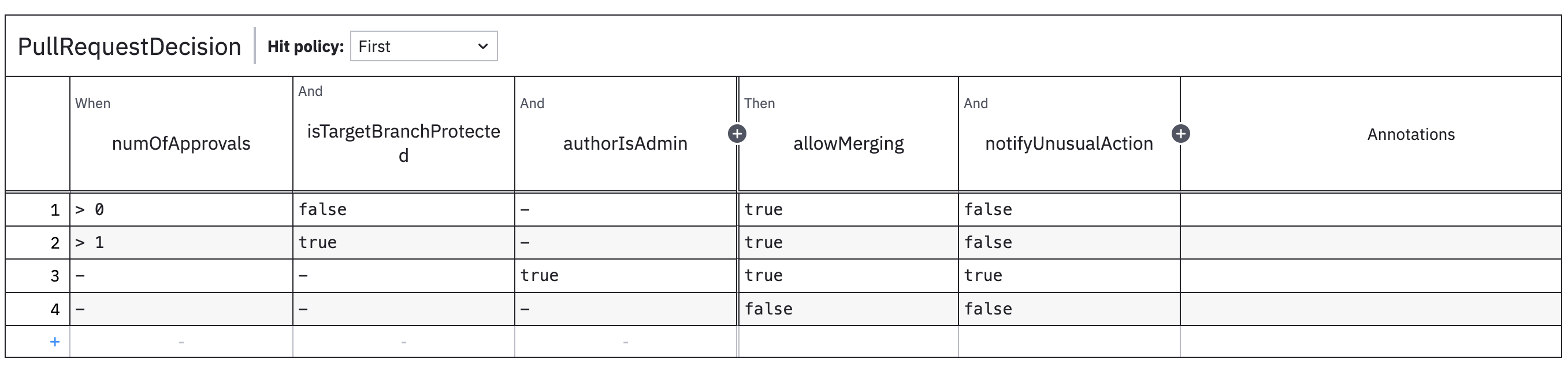
DMN is an XML file that is not human-friendly without a way to render it. Decisions4s comes with an additional utility that allows converting the DMN into an image through dmn-js library.
Rendering the image involves running a web browser through Selenium and capturing screenshots from there. By default, the assumed browser is Chrome and so ChromeDriver needs to be installed.
This process is rather slow and not recommended for live server-side usage.
"org.business4s" %% "decisions4s-dmn-to-image" % "0.1.2"
import decisions4s.dmn.image.*

val converter = DmnToImageConverter()
converter.convertDiagram(dmnXml)
Example output
Alternative Visualizations
It's possible to convert DecisionTables into other formats, e.g., csv file or alternative markdown representations.
Users are encouraged
to write their own representations
using decisions4s.internal.RenderUtils.prepare
that converts a decision table to a structured format ready for further customizations.