Getting Started
To get a glimpse of what Decisions4s can do, we'll model rules governing a pull request process.
We want to define four rules:
- An unprotected branch requires 1 approval.
- A protected branch requires 2 approvals.
- An admin can merge anything without approvals, but this sends a notification.
- Nothing can be merged otherwise.
As the first step, add the following dependency to your project:
"org.business4s" %% "decisions4s-core" % "0.2.1"
Defining the Rules
We start by defining the input and output of the decision:
import decisions4s.*
case class Input[F[_]](
    numOfApprovals: F[Int],
    isTargetBranchProtected: F[Boolean],
    authorIsAdmin: F[Boolean],
) derives HKD

case class Output[F[_]](
    allowMerging: F[Boolean],
    notifyUnusualAction: F[Boolean],
) derives HKD
We take three values as input and provide two values as output. Both input and output are defined as case classes, with each field wrapped in the F[_] type parameter. This pattern is sometimes referred to as Higher Kinded Data, which is also the name of the typeclass automatically derived for our types.
Now let's define the rules:
def rules: List[Rule[Input, Output]] = List(
  // Unprotected branch requires 1 approval
  Rule(
    matching = Input(
      numOfApprovals = it > 0,
      isTargetBranchProtected = it.isFalse,
      authorIsAdmin = it.catchAll,
    ),
    output = Output(allowMerging = true, notifyUnusualAction = false),
  ),
  // Protected branch requires 2 approvals
  Rule(
    matching = Input(
      numOfApprovals = it > 1,
      isTargetBranchProtected = it.isTrue,
      authorIsAdmin = it.catchAll,
    ),
    output = Output(allowMerging = true, notifyUnusualAction = false),
  ),
  // Admin can merge anything without approvals but this sends a notification
  Rule(
    matching = Input(
      numOfApprovals = it.catchAll,
      isTargetBranchProtected = it.catchAll,
      authorIsAdmin = it.isTrue,
    ),
    output = Output(allowMerging = true, notifyUnusualAction = true),
  ),
  // Nothing can be merged otherwise
  Rule.default(
    Output(allowMerging = false, notifyUnusualAction = false),
  ),
)
And create a decision:
val decisionTable: DecisionTable[Input, Output, HitPolicy.First] =
  DecisionTable(rules, name = "PullRequestDecision", HitPolicy.First)
By doing this, we specified a name that will be used for the generated diagram. We also defined the hit policy, which in our case will capture the first satisfied rule.
Evaluating the Decision
Now we can evaluate our decision:
val result: EvalResult.First[Input, Output] = decisionTable.evaluateFirst(
  Input[Value](
    numOfApprovals = 2,
    isTargetBranchProtected = true,
    authorIsAdmin = false,
  ),
)
assert(result.output == Some(Output[Value](allowMerging = true, notifyUnusualAction = false)))
It works!
Understanding the decision
But you might wonder why the given decision was made. Wonder no more!
println(result.makeDiagnosticsString)
Which gives us the following:
Evaluation diagnostics for "PullRequestDecision"
Hit policy: First
Result: Some(Output(true,false))
Input:
  numOfApprovals: 2
  isTargetBranchProtected: true
  authorIsAdmin: false
Rule 0 [✗]:
  numOfApprovals          [✓]: > 0
  isTargetBranchProtected [✗]: false
  authorIsAdmin           [✓]: -
  == ✗
Rule 1 [✓]:
  numOfApprovals          [✓]: > 1
  isTargetBranchProtected [✓]: true
  authorIsAdmin           [✓]: -
  == Output(allowMerging = true, notifyUnusualAction = false)
This not only tells us which rules were satisfied but also shows the results of specific predicates. This way, we can easily understand what happened!
Visualizing the Logic
Let's see how our logic presents itself in a more concise and human-friendly way. We can render the decision as a DMN diagram and share it as a self-contained URL. First, add the DMN dependency:
"org.business4s" %% "decisions4s-dmn" % "0.2.1"
Then call shareUrl() on the rendered model:
val shareUrl: String = DmnRenderer.render(decisionTable).shareUrl()
For the rules defined above, this produces:
https://business4s.github.io/decisions4s/dmn-viewer/#dmn=eNq9lstu4jAUhvc8ReTF7MA42cwloaKilSoNU9TSNXITk1hy7IwvBd5-nARCRqRJENCsfDnn_0_OZ0v277Ypcz6IVFTwAKDRGDiEhyKiPA7A2_Jx-B04SmMeYSY4CQAX4G4y8COyppxqm6QcGgWgNgcOxylpWFIZDu16onX2E8IQp8aqjoSMoQoTkmJo3WGUcuDYmrgqI5UN3Ww2I5HGZWhGQjib_4HuGP1A9oPz59nDbwgmA8exZYU0_5N9TeVkhQ4lLQxjL-SvIUrP9ptFXi1zid8ZcRKqF4LRcBeAx6eX1yUoBHW-Z9XKFJtEeWZ0sVWMVrZ5DL8TZttk0uf1NMuk-MBMVRmHnIdtJomqKt1nr4hdtvqwMoDFzqd-qPKjaollTPS9xDxMFlJoEmoS9TNGZxu7lTE2OhHySU2jlPJ-dm6nnTD64FcOa53FjInNnMjYntCawmnKsTlcaLrevXGjDGbTMD-StUxpLPA8Lx9Yo5N_4FruagGrA-tjoA3VZKsn32L9yxn7sJgcZeBRp6c4ahBf24NErqDtNmgPe-qWrT0RriCdKmtpGoqu6fRWP6MnDfI-zNU-gY66oKMu6OgCMKgFenP7zpa-OnN0U-boC5i7XczdFubDC5i4Lbivoetedowagbg3xe224e6t3krb66Lt3Yi2dyPa3q1utteGuv_d65S_3tX24X-Pt-IhWC3ZtyqsvUQng39mwTy7
The DMN XML is deflate-compressed and base64url-encoded into the URL fragment, so no server stores the content — anyone with the link sees the same diagram:
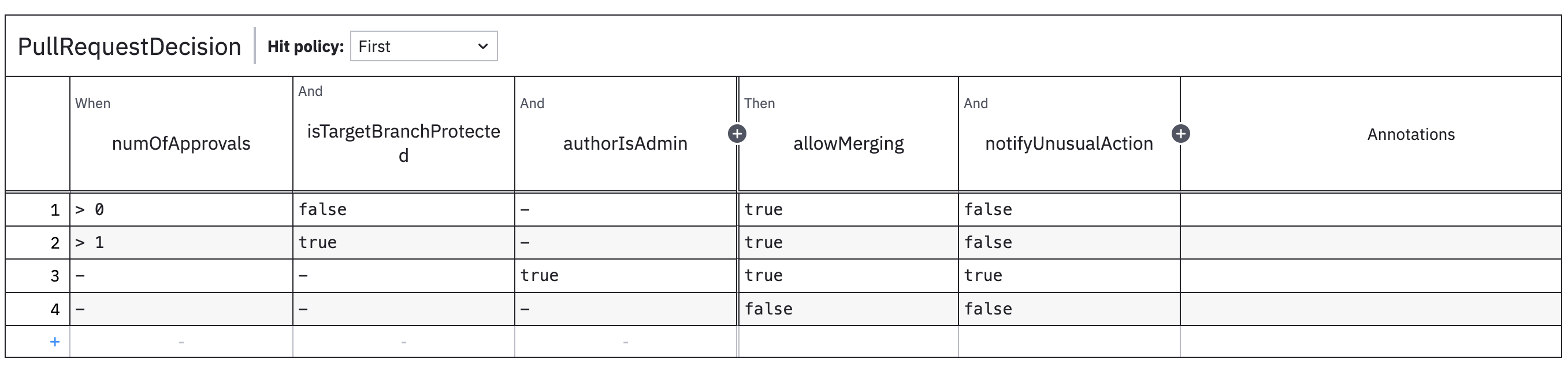
This can now be shared with non-technical folks or saved as documentation. See Visualisations for the full list of rendering options, including Markdown, raw DMN XML, and offline PNG.